


September 29, 2025
myCGS 10.2 Available Now!
We released myCGS 10.2 on August 28!
In this version, we’ve made a wide variety of enhancements and fixes.
New Features/Enhancements
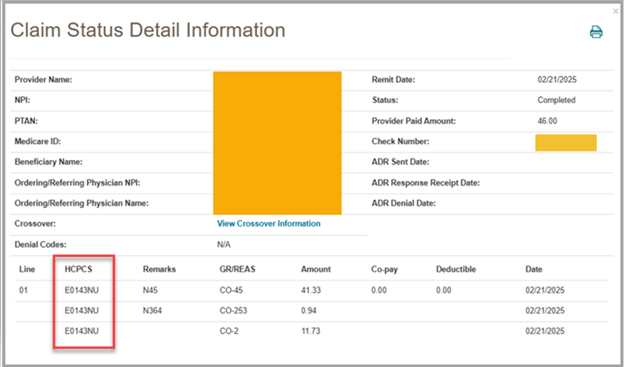
- The Claim Status Detail Information screen now has a HCPCS field to show the HCPCS code that applies to each line.
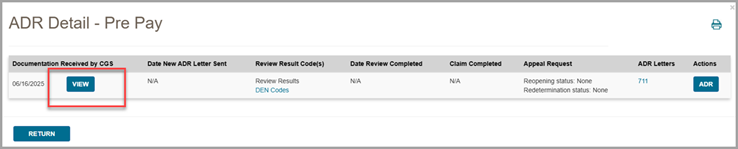
- The ADR Detail pop-up screen now includes a new View button so you can view documents received by CGS for the ADR.
- The Review Results link on the ADR Detail pop-up screen now shows additional post-pay decision letters.
Features/Enhancements
- We updated numerous screens so that the header information is displayed consistently between different screens.
- We added a note to the Password Update and Security Questions screens stating, “Security questions are case-sensitive (upper vs. lower case letters) and can include spaces. Be sure to enter your answers exactly as they were originally set up.”
- We added a note to the Same/Similar screen under the CMNs Detail Information screen that states, “For oxygen rentals only: this number indicates the total payments for all like modalities in all DME MAC regions.”
- You’ll now get an error message on the Same/Similar screen when entering a date of service greater than 8 years from the current date.
- We added a new optional phone extension field to the Prior Authorization Smart Submission (PASS).
- PASS now allows you to use a checkbox to copy your name and phone number into the contact fields rather than typing out this information.
- We updated all document submission screens. If you try to upload multiple files with the same name, you’ll get an error message. If you submit more than 1 file, each file must have a unique name.
- The Redeterminations and Reopenings Request Summary screens now show the claim lines listed in the same order that they appear in our claim processing system.
- The Redetermination and Reopening Request Forms now allows you to enter up to 1,000 characters in the “Reason for Redetermination/Reopening” text box (previously the max was 500 characters).
- The Beneficiary Eligibility Summary screen now includes a note showing the exact date span of information returned (1 year prior to and 4 months after the date of service entered in the search).
- The Claim Status Detail Information screen now displays consistently regardless of how you access this screen.
- We updated the Individual User Permissions screen for Designated Approvers (DAs), so that the top header bar stays locked in place when a user scrolls down through the table.
- We added the MBI Lookup Tool as a permission option (DAs) to the User Permissions screen.
- If a DA denies an End User’s recertification, the End User gets an email to let them know.
Fixes
- We removed the “Log in Help” link on the myCGS® splash page that was broken.
- In some situations, pressing the CCN link on the Claim Status Detail Information screen resulted in an error. This has been fixed.
- On the OPR Request Submission Form and in PASS, the email address field was not allowing email addresses that contain a hyphen and dash. This has been fixed.
Feedback Button
Do you have any ideas you’d like to see implemented in myCGS? Use the “Feedback” button found in our web portal to let us know!
 Join Electronic Mailing List
 Print
Print Bookmark
 Facebook
 YouTube
 LinkedIn
 CGS Medicare Mobile App