


Prior Authorization: WISeR
Ohio Part A & Part B users can access this form. Use the PA WISeR form to request prior authorization for items or services subject to the Wasteful and Inappropriate Service Reduction (WISeR) Model.
NOTE: Facility information auto-populates based on the user ID used to log in and can't be edited. You must log in with an ASC account to submit a prior authorization request for services provided in an ASC setting. If you don't have access to an ASC account, please fax your request.
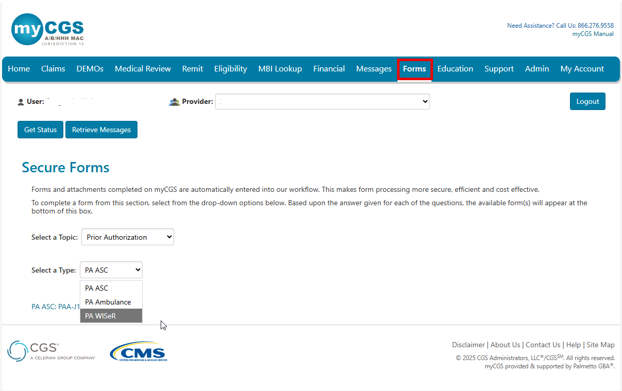
- Select 'Forms'.
- Select 'Prior Authorization' from the 'Select a Topic' drop-down menu.
- Select 'PA WISeR' from the 'Select a Type' drop-down menu.
- Click the link to open the form.
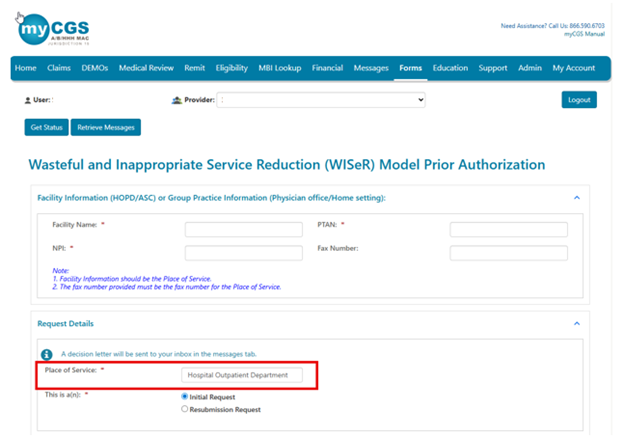
Facility or Group Practice Information
This section describes the place of service (i.e., where you plan to provide the WISeR items or services). Report the following:
- Facility Name
- PTAN
- NPI
- Fax Number (optional; report the place of service fax number only)
Request Details
Select the appropriate 'Place of Service' option:
- Part A users: Hospital Outpatient Department (only option)
- Part B users:
- Ambulatory Surgical Center
- Physician Office
- Home Setting
Select the appropriate request type:
- Initial Request (first request for this beneficiary and date of service)
- Resubmission Request (subsequent request after receiving a non-affirmation decision)
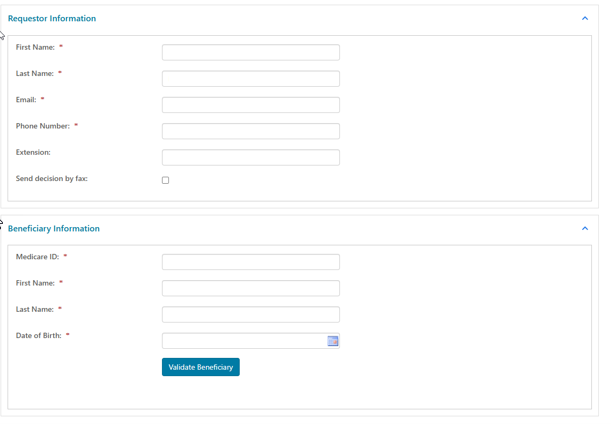
Requestor Information
This section describes the person who should receive the prior authorization decision. Report the following:
- First Name
- Last Name
- Phone Number
- Extension (if applicable)
- Send decision by fax (check box, if applicable)
Beneficiary Information
This section describes the patient who will receive the items or services. Report the following (as it appears on the current Medicare card):
- Medicare ID
- First Name
- Last Name
- Date of Birth
You may use the 'Validate Beneficiary' button to verify that the information you enter matches the eligibility file.
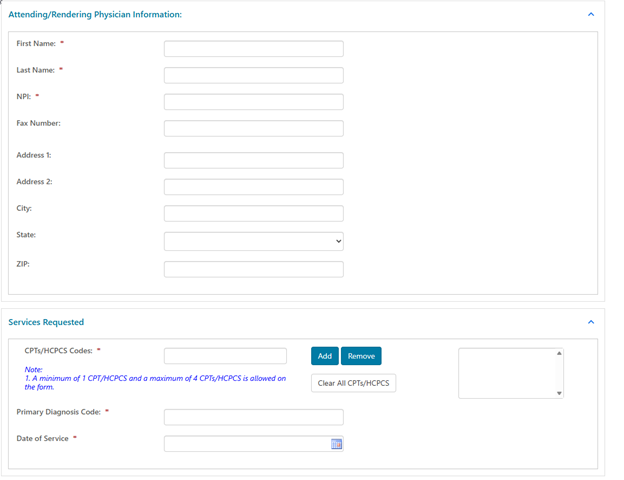
Attending/Rendering Physician Information
This section describes the physician who will provide the item or service. Report the following:
- First Name
- Last Name
- NPI
- Fax Number (optional; the prior authorization decision will be faxed to this number)
- Address (optional; the prior authorization decision will be mailed to this address)
Services Requested
This section describes the WISeR items or services for which you're requesting prior authorization. Report the following:
- CPT/HCPCS Codes
- Key 1 CPT/HCPCS code; click 'Add'.
- You may add up to 4 codes.
- Primary Diagnosis Code
- Date of Service
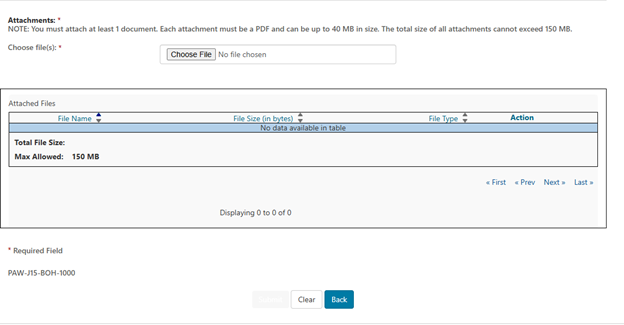
Attachments
You must attach at least 1 PDF document (up to 40 MB). The total size for all attachments can't exceed 150 MB.
Select 'Choose File'. Follow the prompts to locate and attach your document(s).
Submit
When ready, click 'Submit'.
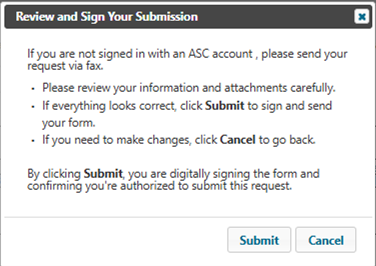
The e-Signature box will display. First, review to ensure all required fields and attachment(s) are complete and correct.
- If satisfied, select 'Ok'.
- If not, select 'Cancel' to make any corrections to the form or attachment(s).
If you don't have access to an ASC account, you will receive the message below, Please fax your request.
Messages
Go to 'Messages' to view the following notifications in your Message Inbox:
- After you submit the form, myCGS will deliver a message with your request details (confirmation).
- Once Innovaccer completes the review, you'll receive a decision letter.

 Join Electronic Mailing List
 Print
Print Bookmark
 Email
Email Facebook
 YouTube
 LinkedIn